
Bubble Maps Software9.0 - Download
You'll be able to download in few seconds.
Publisher Description
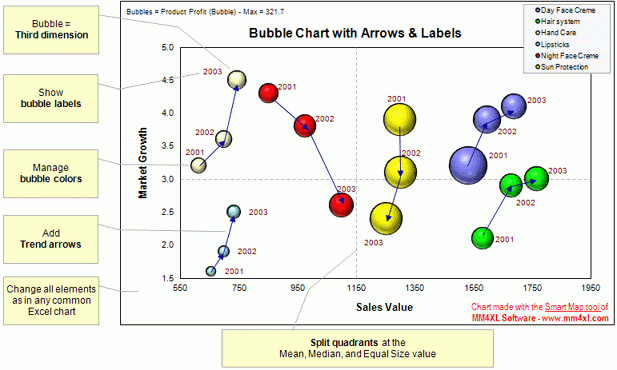
Bubble maps software does scatter plot and circle charts in Excel, useful for advanced business analysis.
Excel provides the ability to draw bubble maps and scatter plots, but they are less refined than a bubble map you can make with the Smart Bubble Charts software. In Excel: (1) Chart labels cannot be displayed; (2) Arrows linking bubbles are not available; (3) Changing bubble color is a tedious process; (4) There is no way to automatically rescale quadrants or set the horizontal axis to a mean or median value; (5) The bubble maps tool of MM4XL software helps you overcome these and other limitations and save a lot of time.
A scatter diagram is an effective tool for investigating relationships among variables. It can be employed to investigate: Segmentations occurring in the data set; Associations between dependent and independent variables;
Predictions of future performance.
Thinking of marketing and sales, bubble maps help managers and analysts to: Identify groups of competitors that perform in a similar manner; Analyze the spread of sales among products; Search for free and interesting market opportunities; Find relationships and association among variables.
The Smart Bubble Charts tool is used by business decision-makers and business analysts.
About Bubble Maps Software
This Accounting & Finance program is available in English, French, German, Italian, Spanish. It was last updated on 29 September, 2026. Bubble Maps Software is compatible with the following operating systems: Windows.
The company that develops Bubble Maps Software is MM4XL for Strategic Marketing Analysis. The latest version released by its developer is 9.0.
The download we have available for Bubble Maps Software has a file size of 16.8 MB. Just click the green Download button above to start the downloading process. The program is listed on our website since 2012-01-12 and was downloaded 0 times. We have already checked if the download link is safe, however for your own protection we recommend that you scan the downloaded software with your antivirus. Your antivirus may detect the Bubble Maps Software as malware if the download link is broken.
How to install Bubble Maps Software on your Windows device:
- Click on the Download button on our website. This will start the download from the website of the developer.
- Once the Bubble Maps Software is downloaded click on it to start the setup process (assuming you are on a desktop computer).
- When the installation is finished you should be able to see and run the program.
Program Details
General
System requirements
Download information
Pricing
Version History
version 9.0
posted on 2012-01-12
Trial: Added 7 new days of free trial time
License: New registration model - Buy single tools
Added Online User\'s Guide
Disclaimer
External Download
We do not host Bubble Maps Software on our servers. We did not scan it for viruses, adware, spyware or other type of malware. This app is hosted by the software publisher and passed their terms and conditions to be listed there. We recommend caution when installing it.
The external download link for Bubble Maps Software is provided to you by apps112.com without any warranties, representations or guarantees of any kind, so access it at your own risk.
If you have questions regarding this particular app contact the publisher directly. For questions about the functionalities of apps112.com contact us.
